A thoughtful gaming gift can make time at the desk more comfortable, bring friends into the action, or support a streaming setup. The right choice depends on the recipient’s gear and how they like to play.
These nine ideas cover sound, controls, networking and workspace additions, with options for different setups and spending levels.
9 Gift Ideas for Gamers, from Setup Upgrades to Playtime Essentials
SteelSeries Arctis Nova 7P Wireless Gaming Headset

- Wireless connections work across PC, PlayStation, Switch or tablet with a portable USB-C dongle.
- The 38-hour battery can gain 6 hours of play after a 15-minute charge.
- The retractable microphone can be hidden for a commute.
Best Gift For: A gamer who plays across PlayStation, PC, Switch, VR or mobile and would appreciate one headset for several devices.

HUANUO FlowLift Dual Monitor Stand

- Fits computer screens from 13 to 32 inches when the weight and VESA requirements also match.
- Each arm holds monitors weighing 4.4 to 19.8 lbs.
- Built-in cable management guides wires along the arms.
Best Gift For: A PC gamer with two compatible monitors who wants to free up desk space and adjust screen positions.
Valerion VisionMaster Pro2 Triple Laser Projector
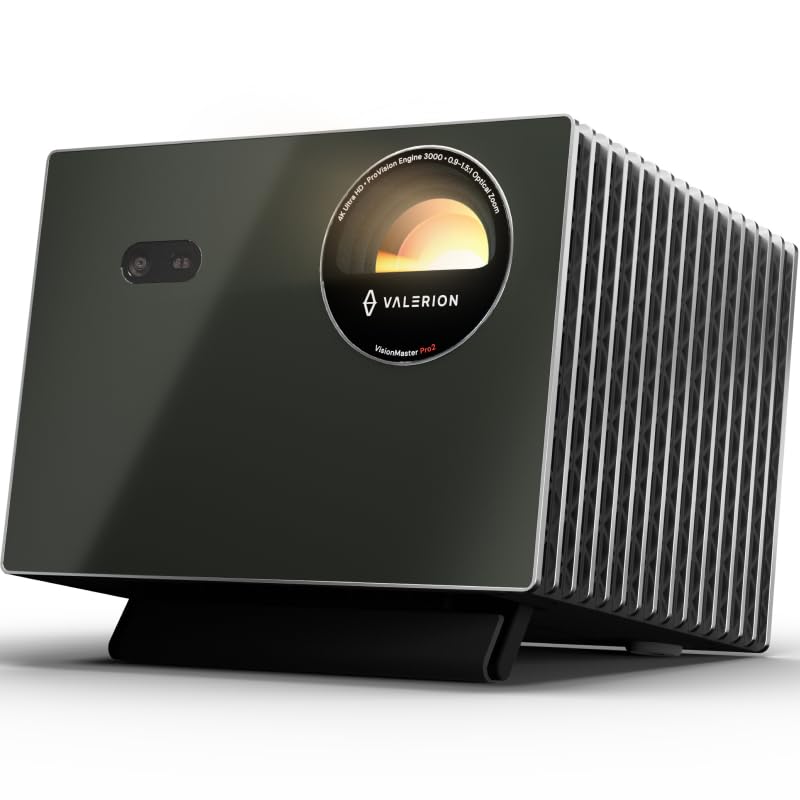
- Displays 4K UHD clarity enhanced by AI Super Resolution.
- Offers 4ms input lag and a 240Hz refresh rate on ultra-wide 21:9 or 32:9 screens.
- Built-in Google TV+ gives access to streaming platforms.
Best Gift For: A gamer who wants to enjoy games on a large projected screen and has room for a projector setup.
SteelSeries Apex Pro TKL Gaming Keyboard

- Per-key actuation has 40 levels, from 0.1 to 4.0 mm, to customize key response.
- Two actions can be programmed to the same key.
- The keyboard has a detachable USB-C connection.
Best Gift For: A PC gamer who likes to customize key response and wants a tenkeyless desk setup.
Audioengine A2+ Wireless Computer Speakers

- Compact powered speakers are engineered for nearfield listening on desks.
- Stream wirelessly from phones, tablets and computers, or connect through wired inputs.
- Hand-finished real wood cabinets reduce unwanted resonance.
Best Gift For: A gamer who enjoys desktop sound for games, music, videos and calls without always wearing headphones.
TP-Link Archer AXE75 Tri-Band WiFi 6E Router

- The 6 GHz band brings more bandwidth and faster speeds.
- Tri-band and OFDMA technology increase capacity for simultaneous device use.
- A modem is required for most internet service providers.
Best Gift For: A gamer whose household has many connected devices and wants a router made for gaming and streaming.
SteelSeries Aerox 3 Wireless Gaming Mouse

- The holey shell weighs 68g.
- Connects wirelessly through 2.4GHz for gaming and Bluetooth 5.0.
- Mouse interiors are shielded from water splashes, dust and dirt, with IP54-rated technology.
Best Gift For: A gamer who prefers a lightweight wireless mouse for quick movement during play.
SABRENT USB-C Hub & M.2 SSD Dock

- Includes an M.2 slot for an M.2 SATA or NVMe SSD.
- The HDMI port supports an external display at up to 4K@60Hz on compatible devices.
- Designed for Windows, macOS and Linux systems.
Best Gift For: A laptop or handheld gaming device owner who wants extra ports and storage options for a flexible setup.
FIFINE T669 USB Microphone Kit

- Connects to a PC or laptop through plug-and-play USB without extra hardware or drivers.
- The kit includes a desktop boom arm stand and an 8.2-foot USB cable.
- The product is incompatible with Xbox.
Best Gift For: A gamer who records, streams or chats from a PC and would use a desk-mounted microphone.
1. Match gifts for gamers to the way they play
When choosing gifts for gamers, start with the recipient’s actual routine. Someone who plays on a console and PC may value flexible audio, while a person who streams or records could use a microphone for voice chat.
Think about whether they play alone, join friends online, or share a room with other people.
Consider the setup before choosing a larger accessory. A monitor stand needs compatible screens and a suitable desk; a projector needs a room where a large image makes sense.
A router upgrade can affect the whole household, so consider how many devices share the network and whether the current internet equipment is compatible.
Small details can make a gift feel personal. Notice whether the player tends to use headphones, speakers, a handheld device or a dual-screen workspace.
That clue can help you choose something they will use often instead of an impressive item that does not fit their habits.
2. Balance the budget with setup needs
Gaming gifts span modest desk additions to major entertainment upgrades. Set a comfortable spending level first, then decide whether to prioritize everyday convenience, a specific play experience or a shared household benefit.
A practical accessory can feel thoughtful when it solves a real annoyance at the desk.
For a higher-cost choice, confirm that the recipient will have a place and use for it. A large display setup may be exciting for someone with a dedicated room, but a compact work area might make a smaller accessory more useful.
Ask a trusted family member if you are unsure about their current equipment.
Before ordering, check actual prices and the full package contents. Some gifts may depend on separate equipment or a compatible host device.
Compare what is included with what the recipient already owns so the gift does not require a surprise add-on to become useful.
3. Personalize gifts for gamers around their setup
Gifts for gamers feel more considered when they reflect a particular player’s style. A keyboard fan might enjoy experimenting with key response, while a voice-chat regular may appreciate a dedicated microphone.
For a player who moves between devices, consider whether a gift can fit more than one part of their routine.
Presentation can add warmth without making the gift complicated. Pair a desk accessory with a handwritten note about a game night, or wrap a setup upgrade with a small snack for their next session.
If the present is too large to wrap easily, a printed picture and a promise to help arrange the space can make the moment feel special.
For shared households, think about who else will benefit. Speakers, networking gear or a large-screen setup can change the experience for friends and family as well as the recipient.
A note explaining why you picked it can make the gift feel connected to their interests rather than simply another piece of hardware.
4. Check compatibility before buying
Compatibility is especially important with gaming hardware. Check the recipient’s platform, available ports and existing accessories before settling on a headset, microphone, hub or router.
When you cannot check directly, look for a discreet way to confirm their setup or ask someone who knows it well.
For desk-mounted gear, confirm screen size, mounting holes, desk material and available space. For storage or display accessories, verify that the recipient’s device supports the connection and feature they need.
A quick compatibility check can prevent an otherwise thoughtful gift from becoming difficult to install or use.
Keep the receipt or gift receipt when available, and review the seller’s return terms before purchase. This gives the recipient room to exchange a fit issue while preserving the thought behind your choice.
Avoid assuming that similarly named models or devices use identical connections.
5. Plan a useful last-minute gaming gift
For a last-minute choice, start with products that match equipment you can confirm. A compact desk accessory or audio addition may be easier to fit into an existing setup than a major screen or networking change.
Check current details carefully, especially included cables, required devices and compatibility.
If timing matters, review delivery estimates at checkout rather than assuming a particular arrival date. When a physical gift may arrive late, give a simple card describing the gift and share an honest update about the expected timing.
A personal message can make the gesture feel complete while the package is on its way.
A quick gift can still feel thoughtful when it is tied to a real interest. Mention the kind of game session, streaming project or setup improvement you had in mind.
The best choice is one the recipient can enjoy without guesswork, so take a final moment to confirm fit, space and the details that matter to them.